
|
Provides a robust management console so you can easily orchestrate, manage and prioritize the queuing of work and processing activity for Pega software robots. Dashboards, reports and drill-downs monitor robot health, work status, SLA compliance, and auditing.
Provides an automation authoring experience designed for rapid development and delivers the most powerful application automation and integration capabilities available today. The visual design surface makes it easy to create workflows and apply business rules through shapes or by recording workflows.
Robotic automation is the application of software to automate tasks and processes otherwise performed by humans. Simply, robotic automation is software automating software. Software robots can fully automate essential business transactions through Robotic Process Automation (RPA) or optimize the way people work with Robotic Desktop Automation (RDA). The goal of robotic automation is an improved customer experience and operational excellence through increased efficiency, performance, and agility in the day-to-day activities across the enterprise. Robotic Process Automation & Desktop AutomationOrganizations using Robotic Desktop Automation and Robotic Process Automation are realizing a faster and greater return on investment when both are leveraged in the transformation journey. By removing lower value, repetitive activities from the desktop—such as application sign-on and call set-up—CSRs in your front office can focus on the customer and deliver exceptional service. In the back office, fully automating high-volume, rules-based processes to reduce costs, accelerate productivity, and decrease errors will free employees to perform higher-value work. Some key benefits customers experience with robotic automation:
Workforce Intelligence & Robotic AutomationIntelligence and robotic automation help enterprises maximize the value of their two biggest investments, people and technology, by understanding how users interact with applications. Pega robotic process automation, desktop automation, workforce intelligence, and case management together to enable more productive employees and a better customer experience. Unlike RPA-only solution providers, Pega offers end-to-end Robotics, CRM, and BPM for any digital enterprise, giving organizations the power to:
Pega provides the only software automation solution capable of simplifying desktops and boosting productivity while enabling full automation of end-to-end processes.
Enable a single instance to serve multiple client organizations (tenants). Each tenant views the system as a complete, independent Pega 7 system. Enable lower infrastructure and maintenance costs, fast provisioning of new tenants, and simple administration. Maximize reuse with a native, fully-shared multitenant architecture.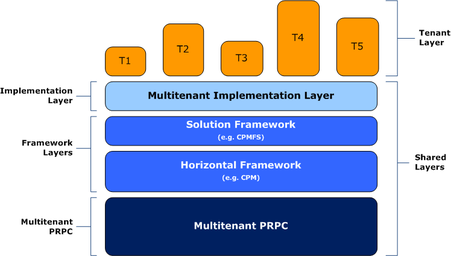 With PRPC Multitenancy, tenants share the entire infrastructure including hardware, database, application server, PRPC applications and frameworks. This architecture offers significant operational and administrative savings through the reuse and sharing of the application assets. In contrast to a standalone PRPC system, each tenant has access to shared resources and content from which tenant-specific customizations can be made. When a tenant customizes shared content, it becomes tenant qualified and can only be viewed and used by that tenant.  Manage tenants via landing pages and SOAP Services.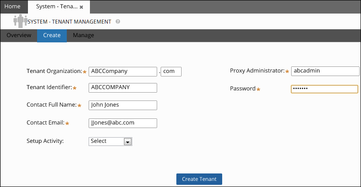 New landing pages enable a multitenant provider to easily create and manage tenants. Tenant provisioning is fast and customizable with PRPC activities. All tenant administration capabilities can be managed using SOAP services. The remote management capabilities make PRPC Multitenancy well suited to and useful for cloud-based operations. Leverage PRPC's security model to protect tenant data, content.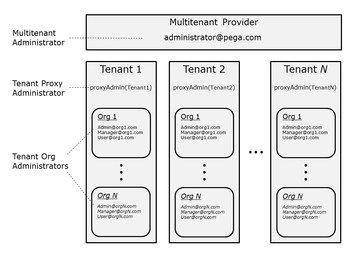 PRPC Multitenancy leverages and expands PRPC's security model with new multitenant roles and privileges. Added at install time, these new security constructs are enforced using standard mechanisms. This approach enables multitenant security to evolve to meet future customer needs, while never compromising a tenant's data or content.
Summary Use a data transform (known before PRPC 6.2 as a "model rule") to define how to take source data values — data that is in one format and class — and turn them into data of another format and class (the "destination" or "target"). What a data transform does Generally speaking, a data transform defines how to take source data values — data that is in one format — and transform them into data of another format (the "destination" or "target"). In PRPC, you can use a data transform to:
Note: Prior to version 6.2, data transforms were known as model rules, and only involved setting property values. Data transforms now provide more powerful actions than they previously could. A data transform is a structured sequence of actions. When the system invokes the data transform, it invokes each action in turn, following the sequence defined in the data transform's record form. The Data Transform record form On the data transform's Definition tab, the actions to be taken are presented as a sequence of rows in a tree grid. Except for the conditional types of actions (such as When, For Each Page In, and similar actions) and transitional actions (such as Exit For Eachand similar actions), the system invokes each row in sequence, starting with the first row. In the example below, the data transform CopyShippingInformationToBilling maps data from the shipping information for an order to the order's billing information. 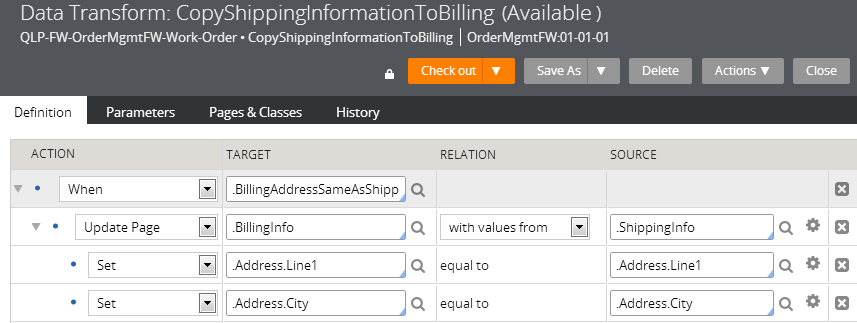 In general, each row provides for: ColumnDescriptionActionAn action to be taken.
TargetA target, if the action requires a target. RelationA relation, if the action requires a relation to be specified. This relation is a relationship between the specified target and source. SourceA source, if the action requires a source. In this post, i would introduce in brief as to what Pega’s CPM framework is about. Pega Customer Process Manager (CPM) is one of the products in Pega’s CRM suite of solutions. This framework is primarily to guide Customer service representatives (CSRs) in processing customer service inquires and requests from initiation through resolution. In effect, it helps CSR’s to view complete information about the customer in a single view, take customer queries and initiate a workflow process to resolve them. These customer queries are known as ‘service intents’ in pega parlance. There are few terminology used in CPM framework that you should be aware of – 1. Composite – this is the area where you view the 360 degree of the customer. Pega’s integration services are used to connect with external systems to retrieve information and thereby shown in separate sections in the composite area 2. Service intents – these are the customer inquiries that i mentioned of. In an OOTB CPM framework, you would see the following service intents. 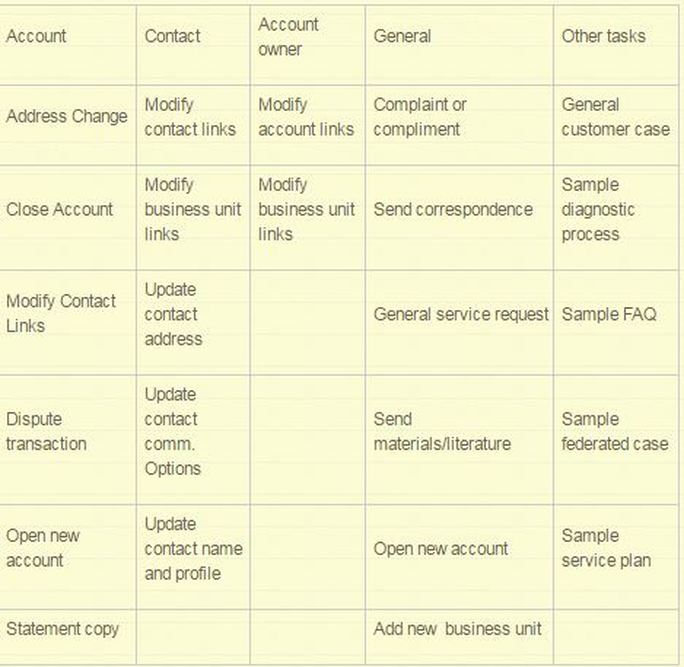 The usual flow is that when a customer calls up a CSR, the CSR would ask for his account information, that could be the customer ID, etc. Post this, the CSR would verify the identity of that person by asking few questions. On successful verification, the CSR sees the complete information of the customer. This is to help the CSR view what are the previous complaints, or queries, or services that were requested by the customer. In the above table, within account category, a customer could request for address change. The CSR would launch this service and complete the request. 3. Dialog scripts – The intention of dialogs is to assist CSR in the flow. Basically, these are nothing but scripts that appear along the interaction with the customer. For example – when a customer calls the CSR, the system will show up a dialog saying ‘Hello Mr. XXX, How can i help you today?’ Few screenshots to drive the story – 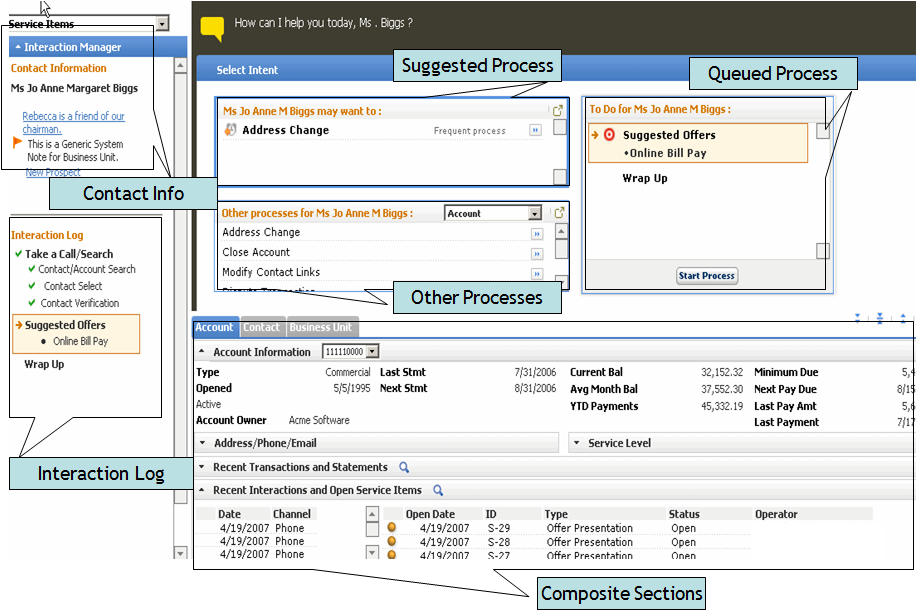 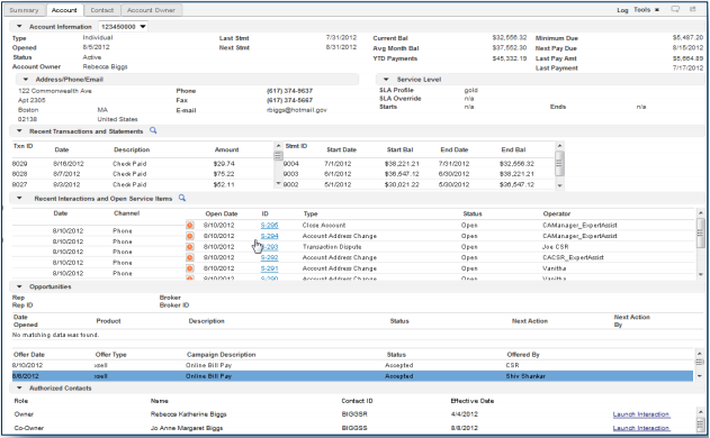 Pega 7 provides two case locking options and capabilities. You make your basic configurations in the Case Designer at the top-level case type. The settings cascade to all the subcase types.
Approach To begin, open a top-level case type in the Cases Explorer and open the Details tab. On the Locking option, click the Edit link. 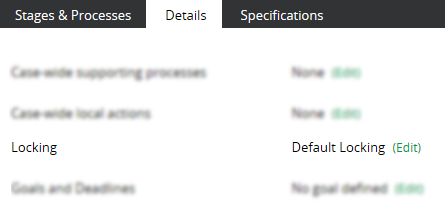 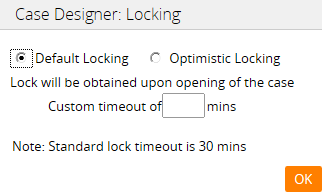 Default Locking Sets to standard locking behavior; the system locks a case when it is opened by a user for a period of up to 30 minutes. No other user can open or work on it. You can change the standard time period in the Custom timeout field. This conservative approach helps ensure that data can be updated in both parent and subcases with transaction integrity. For example, the parent case may contain properties that count or total values in the subcase. Locking both at once helps keep these counts or totals in sync. Overriding default lockingIf default locking hampers user throughput in your application, you can override the setting at the subcase level. This lets users concurrently make updates to both parent cases and their subcases without conflict. To override default locking:
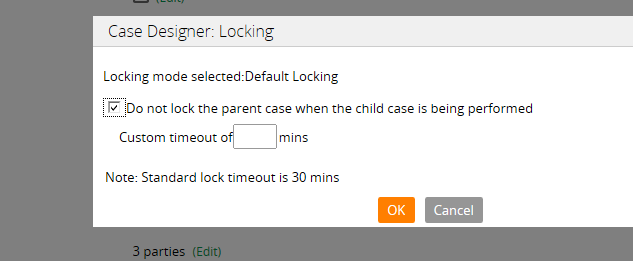 Note This setting is not available for optimistic locking since there is no lock on either the parent or the subcase. Optimistic lockingThe top-level case and all of its subcases can be opened in a Perform user form by multiple users for reviews or updates. This setting applies to all subcases and cannot be overriden at the individual casetype level. 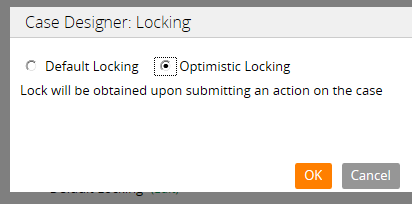 When the first user submits or saves an update, other users who have also opened the case and attempt to submit their updates receive a message indicating that the original form and its data have already been updated; therefore, they cannot submit their updates. In these situations, users can:
Note : The system compares .pxLastUpdateTime of the case on clipboard to the DB’s object to determine whether another user has committed an action since the current user has opened the case. Considerations
In most configurations, use default locking in order to preserve transaction integrity among cases. Optimistic locking may be called for where multiple users need only open and review cases without having to perform updates.
Use the Queue instruction to start asynchronous execution of a second activity. This provides an alternative to the Call instruction, in situations where there is no need to wait for completion of the second activity, or where processing in parallel is feasible and beneficial
BRANCH -- Branching to another activity.Use the Branch instruction to cause the current activity to find another specified activity and branch to it without a return.When the branched activity ends, processing of the current activity ends also; no steps after the Branch step are executed.CALL -- Calling another activity COLLECT -- Begin execution of a collection rule FLOW-NEW -- Start a flow execution JAVA -- Using Java in an activity step QUEUE -- Execute another activity asynchronously RULE -- Using the Rule instruction to implement a custom rule type(Rule instruction is deprecated) Note: Rule instruction is deprecated. Instead, call the evaluate Rule activityUse the Rule instruction to cause the current activity to find another activity named evaluateRule that implements a custom rule type. When this instruction executes, control transfers to that activity. |
Categories
All
Archives
October 2020
Categories
All
|
 RSS Feed
Services |
Courses OfferingPega System Architect ( CSA ) 8.4
Pega Senior System Architect ( CSSA ) 8.4 Pega Lead System Architect ( CLSA ) 8.4 Pega Business Architect ( PCBA / CPBA 8.4 Pega Decision Consultant ( CPDC ) 8.4 Pega Marketing Consultant ( CPMC ) 8.4 Pega Data Scientist ( CPDS ) 8.4 Pega UI Specialist ( PCUIS ) Pega Testing Pega Administation |
CompanySupport |
AddressIndia
Nizampet Rd, Jai Bharat Nagar, Nagarjuna Homes, Kukatpally, Hyderabad, Telangana 500090 USA Greater New York City Area New York -14624 United States |

© Copyright 2011 - 2020. All Rights Reserved.
|
PegaGang all rights reserved. All PegaGang training materials is proprietary content of PegaGang. We Dont Use / Distrubute / provide / Install Pegasystems Materials and Softwares. PegaGang is not an affiliate of Pegasystems. PEGA is a trademark of Pegasystems. Pegasystems is not the publisher of the training material and is not responsible for it in any aspect.