
|
Federated Case Management (FCM) enables you to connect version 6.3 and 7.1 PRPC applications. Users in a federation (a group of applications connected by FCM) work in their local application portal, which can display cases and assignments from other applications in the federation. It uses Internet Application Composer (IAC) for intersystem communications. Each local application processes and maintains its own cases and data, and publishes data to a centralized database, the Federated Case Management Repository (FCMR). Users in a federation (a group of applications connected by FCM) work in their local application portal, which can display cases and assignments from other applications in the federation. Each local application processes and maintains its own cases and data, and publishes data to a centralized database, the Federated Case Management Repository (FCMR). In a federated system, the terms local and remote are relative to a specific user and to a specific case. Each user on a federated system logs into a single application, his or her local application. Remote cases (that is, cases in other applications within the federation) can be created, viewed, and worked on from within the user’s local application portal. No re-design of any application’s user interfaces is required. FCM enables users to create, view, and work on remote cases of that type from within the local application portal as though they were local cases, even though all processing for each case still occurs in its local application, and all of the data related to each case is still stored in its local application’s database. The diagram below illustrates an example in which a user logged into the CPM-FS application will be able to create, view, and work on DisputeTransaction cases in a separate application, SmartDispute. 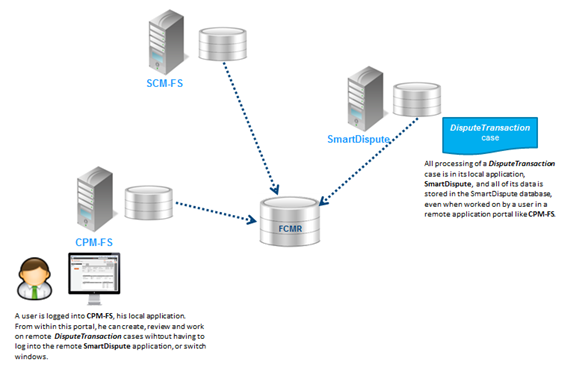 In practice, the distinction between local and remote cases is irrelevant to the user. The FCMR consolidates work items and makes them available to all users in the federation. Users generally need not know the source of a case or assignment. All work performed on a case occurs in its local application, and all data for a case is stored in its local application’s database.
The FCMR contains class tables for federated versions of key PRPC classes, e.g. Work-Federated and Assign-Worklist-Federated. Instances of the federated classes serve as lightweight pointers to class instances residing in a federation’s local application databases. To make publishing data to the FCMR as efficient as possible, federated classes in the repository contain no BLOB fields, only a handful of key properties such as ID and status needed to identify and open each case in its local application. The full data for a case resides in only one place, its local application database, and all processing for that case occurs within its local application, even when that processing is being done by a user within a remote application portal. For information about setting up FCM, see the PDN article Setting up and configuring Federated Case Management. FCM Limitations:
Case type dependency relationships control automatic case instantiation, or the completion of a workbasket assignments (also referred to as a "mid-process dependency"). The case types must belong to the same top-level case type, and should not have parent/child covering relationships (to help avoid deadlocks).
Instantiation dependencyThis relationship exists when a dependent case type automatically instantiates only when one or more other case type instances (under the same top-level case type, and at sibling or cousin-levels) are created, completed, or reach a specified work status. Top-level case types cannot have instantiation dependencies. To create this relationship:
A case type is a work class that inherits from Work–Cover– and contains a case type rule. A case type can cover or be covered by other case types. A case management structure can also include work classes that inherit from Work-. These work classes may be covered by case types, but cannot cover other work classes or case types. The covering relationships among case types are defined in case type rules. As a best practice, configure the case type structure in the Case Explorer.
When a case type work item (case) is created, the case is said to be instantiated. Be careful not to confuse a case with a case type, which is sometimes referred to as a case. Work classes that inherit from Work– are commonly called work types. Case Management is the business practice that involves managing work that, for processing and reporting purposes, differs from classic Business Process Management work items. Cases may involve:
Case Management design is governed by the Cases Explorer, which is used to configure case type dependencies and related work processing. Using this Explorer you can:
|
Categories
All
Archives
October 2020
Categories
All
|
 RSS Feed
Services |
Courses OfferingPega System Architect ( CSA ) 8.4
Pega Senior System Architect ( CSSA ) 8.4 Pega Lead System Architect ( CLSA ) 8.4 Pega Business Architect ( PCBA / CPBA 8.4 Pega Decision Consultant ( CPDC ) 8.4 Pega Marketing Consultant ( CPMC ) 8.4 Pega Data Scientist ( CPDS ) 8.4 Pega UI Specialist ( PCUIS ) Pega Testing Pega Administation |
CompanySupport |
AddressIndia
Nizampet Rd, Jai Bharat Nagar, Nagarjuna Homes, Kukatpally, Hyderabad, Telangana 500090 USA Greater New York City Area New York -14624 United States |

© Copyright 2011 - 2020. All Rights Reserved.
|
PegaGang all rights reserved. All PegaGang training materials is proprietary content of PegaGang. We Dont Use / Distrubute / provide / Install Pegasystems Materials and Softwares. PegaGang is not an affiliate of Pegasystems. PEGA is a trademark of Pegasystems. Pegasystems is not the publisher of the training material and is not responsible for it in any aspect.