
|
In this post, i would introduce in brief as to what Pega’s CPM framework is about. Pega Customer Process Manager (CPM) is one of the products in Pega’s CRM suite of solutions. This framework is primarily to guide Customer service representatives (CSRs) in processing customer service inquires and requests from initiation through resolution. In effect, it helps CSR’s to view complete information about the customer in a single view, take customer queries and initiate a workflow process to resolve them. These customer queries are known as ‘service intents’ in pega parlance. There are few terminology used in CPM framework that you should be aware of – 1. Composite – this is the area where you view the 360 degree of the customer. Pega’s integration services are used to connect with external systems to retrieve information and thereby shown in separate sections in the composite area 2. Service intents – these are the customer inquiries that i mentioned of. In an OOTB CPM framework, you would see the following service intents. 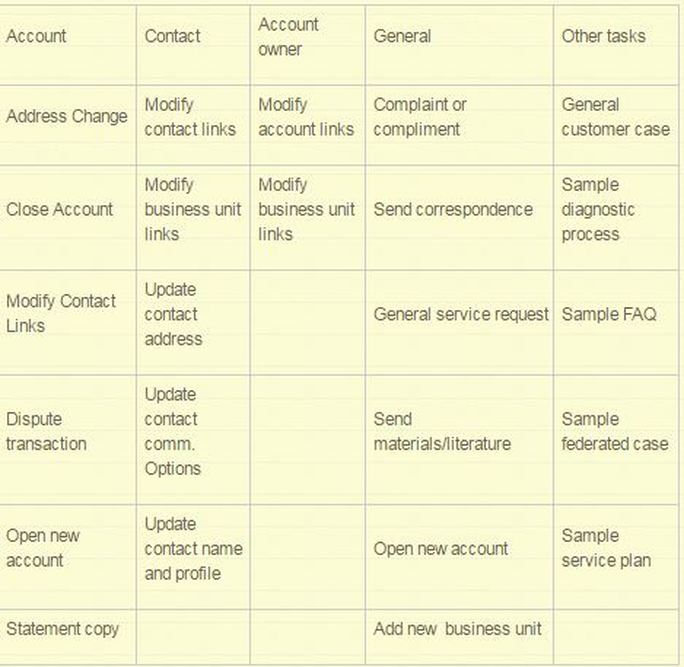 The usual flow is that when a customer calls up a CSR, the CSR would ask for his account information, that could be the customer ID, etc. Post this, the CSR would verify the identity of that person by asking few questions. On successful verification, the CSR sees the complete information of the customer. This is to help the CSR view what are the previous complaints, or queries, or services that were requested by the customer. In the above table, within account category, a customer could request for address change. The CSR would launch this service and complete the request. 3. Dialog scripts – The intention of dialogs is to assist CSR in the flow. Basically, these are nothing but scripts that appear along the interaction with the customer. For example – when a customer calls the CSR, the system will show up a dialog saying ‘Hello Mr. XXX, How can i help you today?’ Few screenshots to drive the story – 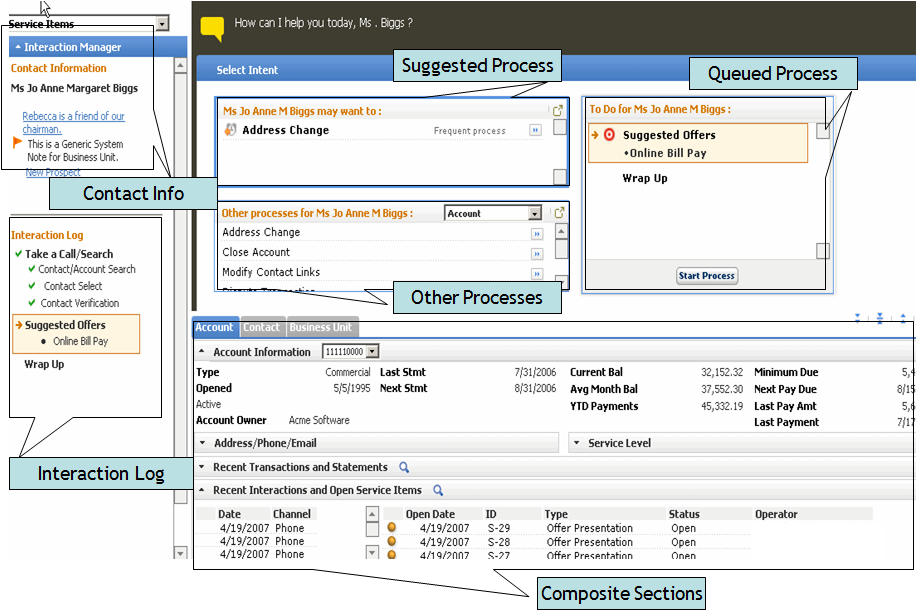 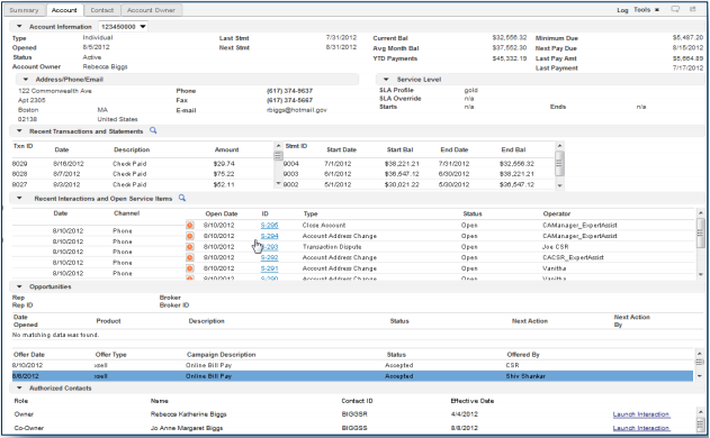 |
Categories
All
Archives
October 2020
Categories
All
|
 RSS Feed
Services |
Courses OfferingPega System Architect ( CSA ) 8.4
Pega Senior System Architect ( CSSA ) 8.4 Pega Lead System Architect ( CLSA ) 8.4 Pega Business Architect ( PCBA / CPBA 8.4 Pega Decision Consultant ( CPDC ) 8.4 Pega Marketing Consultant ( CPMC ) 8.4 Pega Data Scientist ( CPDS ) 8.4 Pega UI Specialist ( PCUIS ) Pega Testing Pega Administation |
CompanySupport |
AddressIndia
Nizampet Rd, Jai Bharat Nagar, Nagarjuna Homes, Kukatpally, Hyderabad, Telangana 500090 USA Greater New York City Area New York -14624 United States |

© Copyright 2011 - 2020. All Rights Reserved.
|
PegaGang all rights reserved. All PegaGang training materials is proprietary content of PegaGang. We Dont Use / Distrubute / provide / Install Pegasystems Materials and Softwares. PegaGang is not an affiliate of Pegasystems. PEGA is a trademark of Pegasystems. Pegasystems is not the publisher of the training material and is not responsible for it in any aspect.